Slay the Spire 2 is in early access and brutal on your first run. This beginner's guide covers which character to start with, why a small deck wins, the two debuffs that carry you, and the new mechanics returning players keep ignoring.

This post may contain affiliate links from places like Amazon and Green Man Gaming, and we may earn a small commission when you click these links. All earnings will go to keeping this website as minimally ad-free as possible.
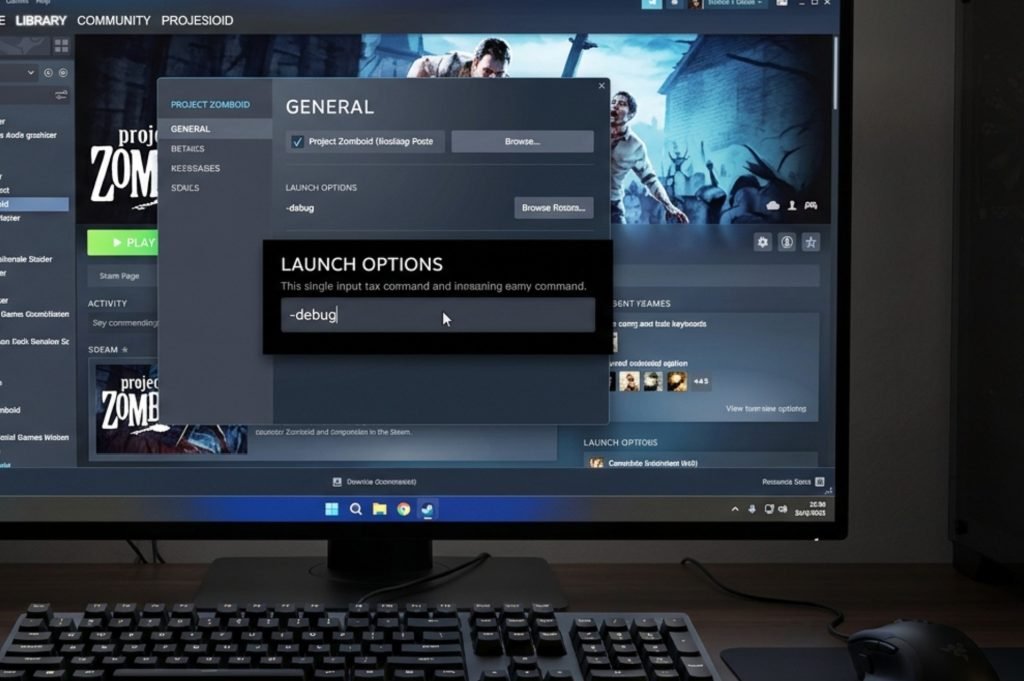
Debug mode is Project Zomboid's master key. With it switched on you can spawn any item in the game, teleport across the map, edit your character's stats, turn on god mode, control the weather, and poke at almost every system the developers use themselves.
The best part is that turning it on takes a single launch option, no mods required. Here is exactly how to enable debug mode in Build 42, how to confirm it worked, and what it unlocks.
If you are after the specific commands and options once you are in, our Project Zomboid cheats and debug commands guide has the full list.
Debug mode is enabled with a Steam launch option, not from inside the game. It takes about thirty seconds:
-debug
That is the whole setup. The launch option tells the game to boot into debug mode every time you start it, so it stays on until you remove it.
Once you are in a game with debug mode active, a small ladybug icon appears on your screen, usually in the top left. That ladybug is your gateway, click it to open the debug menu. If you do not see the ladybug, debug mode did not apply.
Nine times out of ten the fix is simple: go back into Launch Options and check that you typed -debug exactly, with the hyphen and no quotes, and that you set it on the right game. Then fully restart Project Zomboid, not just reload the save.
Click the ladybug and you get the debug menu, which is organized into groups. In the current Build 42 version these include General debuggers, Cheats, Climate debuggers, Craft Recipes, Player's Stats, an Items List, and more.
The highlights are the ones most people turn debug mode on for:
Since item spawning is what most players want, here is the quick version. With debug mode on, open the ladybug menu and go to the Items List. Search for what you want, and click it to add it to your character.
You can also right click in the world and use the spawn options in the context menu. It is the fastest way to kit yourself out or test a build without scavenging for hours.
Turning it back off is just the setup in reverse. Go back to Properties, open Launch Options, delete -debug, and close the window. Then fully restart the game.
The ladybug will be gone and you are back to a normal survival run.
Debug mode is powerful, so two things are worth knowing before you flip it on.
Enabling debug mode in Project Zomboid is a one step job: add -debug to your Steam launch options, start the game, and click the ladybug.
From there you can spawn items, teleport, edit stats, and cheat to your heart's content, just keep a backup save and expect the odd rough edge in Build 42. Once you are in, our full cheats and debug commands guide walks through every option worth knowing.
How do you enable debug mode in Project Zomboid?
Right click Project Zomboid in Steam, open Properties, and in the Launch Options box on the General tab type -debug with the hyphen and no quotes. Close it and launch the game. A ladybug icon appears when debug mode is active.
What is the Project Zomboid debug launch option?
It is -debug, typed exactly with the hyphen and no quotation marks, in the Steam Launch Options for Project Zomboid. It boots the game into debug mode every time until you remove it.
Why is the debug ladybug or menu not showing?
Debug mode did not apply. Check that you typed -debug exactly in Launch Options, with the hyphen and no quotes, that it is set on the right game, and then fully restart Project Zomboid rather than just reloading your save.
Does debug mode disable achievements in Project Zomboid?
Yes. Using debug mode turns off Steam achievements for that save, so use a separate save if you still want to earn them.
How do I spawn items in debug mode?
Open the ladybug menu, go to the Items List, search for the item, and click it to add it to your inventory. You can also right click in the world and use the spawn options in the context menu.
How do I turn debug mode off?
Remove -debug from the Steam Launch Options and fully restart the game. The ladybug disappears and you are back to a normal playthrough.
Slay the Spire 2 is in early access and brutal on your first run. This beginner's guide covers which character to start with, why a small deck wins, the two debuffs that carry you, and the new mechanics returning players keep ignoring.
Which troops should you recruit first in Bannerlord? We break down the best early game units by culture and the fastest ways to level them into elite troops without bleeding your army dry.
Barnburners is an upcoming arcade hockey game from solo indie developer In2itiv. We went hands on with the latest build. Here are our early impressions, and how it stacks up against the more deliberate Center Ice Hockey.
Nascar Heat 5 is perhaps the best Heat game of the franchise. If you're a casual or serious racing fan, you definitely need to try this one out!
Pile Drive into your way into the world of Casual Pro Wrestling. This indie title offers a unique blend of retro, arcade style wrestling, and ragdoll physics.
Indulge in a nostalgic ride with Super Power Racing, the top-down arcade racing game by Monster Finger Games.
Exploring the ramifications of Shohei Ohtani's elbow injury on his MLB career and the baseball world at large.
Want the hypercars without the grind? Here are the fastest, most reliable ways to farm credits in Forza Horizon 6 — from AFK Event Lab loops to Super Wheelspin tricks.
