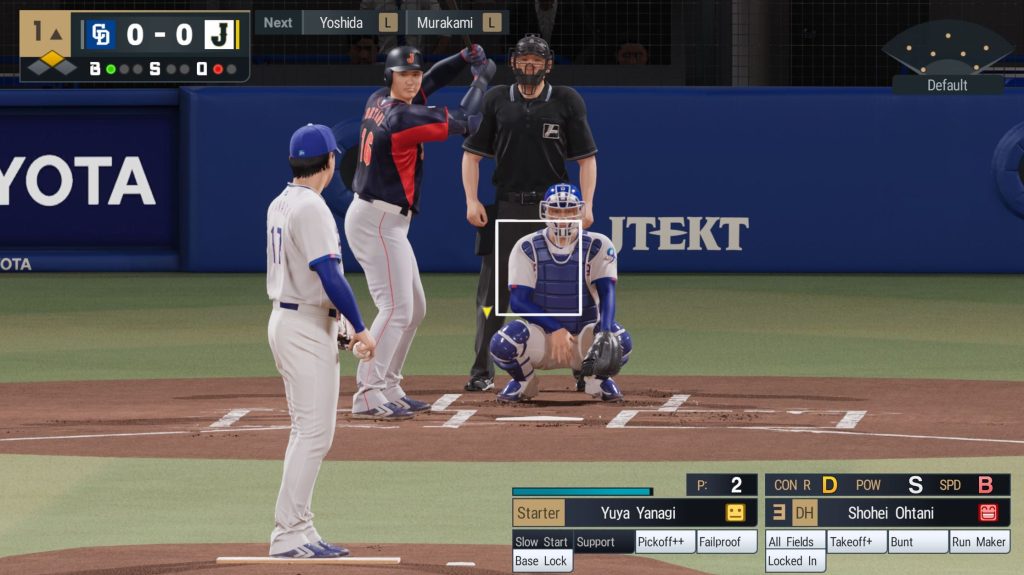
eBaseball Pro Spirit 2026: Best Sim Settings for Players Ready to Ditch the Training Wheels
This post may contain affiliate links from places like Amazon and Green Man Gaming, and we may earn a small commission when you click these links. All earnings will go to keeping this website as minimally ad-free as possible.
eBaseball Pro Spirit 2026: Best Sim Settings for Players Ready to Ditch the Training Wheels
By Joel | August 8, 2026
If you booted up eBaseball Pro Spirit 2026, played an inning, and thought why does this feel like the game is doing my job for me, you are not wrong.
The default setup is built for newcomers, and it is stuffed with glowing cursors, pitch predictions, and safety nets that make the game feel more like a tutorial than a broadcast.
The good news: a few menu tweaks and you have got yourself a genuinely realistic, sim grade baseball experience.
Everything you need lives in User Settings, split across a few tabs. General, Batting, Pitching, Fielding, and a separate CPU tab that controls what the opposing team sees and does.
You can tweak most of this from the main menu before a game.
Several options, including your pitching system, can be changed mid game by calling a timeout.
Practice Mode also lets you fiddle in real time, which is genuinely the best way to feel out these changes before you take them into Season Mode.
Camera and Cursor Basics
Set your camera to TV Fixed. It is the closest thing to actually watching an NPB broadcast, and it forces you to read pitches the way a real hitter would rather than from some tight, arcade style zoom.
Keep the cursor on Digital with Digital Speed set to Normal. Analog movement sounds fancier, but it introduces stick drift that can throw off your timing in ways that have nothing to do with skill.
Leave vibration on too. Once you strip away the visual assists, that rumble becomes a real feedback tool.
Killing the Strike Zone
Here is the single biggest change you can make: HIDE THE STRIKE ZONE
By default, the game gives you a frame outline sitting right over the plate, basically an on screen answer key for every pitch.
Turn it off and you start reading pitcher tendencies, release points, and ball flight the way an actual batter has to, instead of just watching a box.
Yes, it stings for the first few at bats. Once it clicks though, going back to the frame feels like cheating.
Pitching Settings That Matter
This is where the sim experience really comes together.
Pitch Velocity Level: Realistic Speed. Not the slowed down default. It is genuinely uncomfortable at first, and that is the point.
Pitching Assistance Level: off. This puts pitch quality fully on your execution rather than letting the game smooth things over for you.
Pitching system: Double Tap over Classic. Classic mostly rolls dice based on your pitcher's ratings: you aim, press once, and the game decides if it was a good pitch. Double Tap makes you earn it: aim, press once to start the windup, then press again right as the cursor shrinks down. Nail that timing and you get a genuinely perfect pitch, not a stat roll. Style A locks your aim after the first press for a cleaner read, while Style B lets you adjust your target mid windup if you like living dangerously.
Perfect Pitch Flashing: off. So the game does not pop up a PERFECT banner every time you nail one. You will know, the same way a real pitcher knows.
Hide the opponent's pitch cursor and pitch type label. Under the CPU tab, turn these off when you are at bat. A real hitter does not get a little label saying incoming slider. Neither should you.
▶ Tip: One more mechanic worth learning alongside these settings is Power Pitches. Hold R3 up, or hold L3 in any direction, before and during your windup to add extra velocity at the cost of control. Do not spam it. Save it for the moments that actually matter, two outs, bases loaded, the cleanup hitter at the plate, rather than gassing out your starter in the third inning.
Batting Settings for Purists
Turn off the Predicted Pitch Point for your own at bats.
This is the game's version of a guaranteed contact marker. Switching it off means you are genuinely guessing location and timing instead of aiming at a marked spot.
On the pitching side, leave Predicted Pitch Point set to Realistic. This gives you honest feedback on your control without sugarcoating it, which is a different job than handing you a cheat sheet as a hitter.
Do not touch your power swing toggle on R1. This is a core mechanic, not an assist, and part of the actual skill expression the game wants you to use.
Fielding and Base Running
For true purists, set both to Manual.
It is rough for the first several games. Expect misplayed grounders, blown throws, the works.
It is also the only way fielding actually feels earned.
If that is too punishing right out of the gate, Lightly Assisted is a fair middle ground; it still requires real input but forgives the worst of your early mistakes.
Quick Reference Table
Setting
Recommended
Why It Matters
Camera Angle
TV Fixed
Mimics a real broadcast view
Cursor Movement
Digital
Avoids stick drift messing with your aim
Strike Zone Display
Hidden
Forces you to read pitches like a real hitter
Pitch Velocity Level
Realistic Speed
Real world mph, not the training wheel version
Pitching Assistance
Off
Puts pitch quality on you, not the game
Pitching System
Double Tap
Rewards timing and execution over raw ratings
Perfect Pitch Flash
Off
No on screen confirmation, more authentic feel
Predicted Pitch Point (Batting)
Off
Removes the guaranteed contact aid
Predicted Pitch Point (Pitching)
Realistic
Honest control feedback without sugarcoating
Opponent Pitch Cursor and Type
Hidden
You should not know what is coming
Fielding and Base Running
Manual or Lightly Assisted
Manual for full realism, Lightly Assisted as a fair ramp
Catcher Throwback
On
Quality of life, does not hurt realism
Tips for Easing In
Do not flip every setting at once and expect a smooth first game. You will get humbled really quick.
Start with the strike zone and camera, get comfortable, then layer in Double Tap pitching, then finally go full manual on fielding once your reads improve.
Spend real time in Practice Mode dialing in your Double Tap timing before you bring it into Season Mode or Live Championship; the timing window is tight enough that muscle memory matters more than raw understanding.
Also worth noting, online modes may standardize certain settings between both players to keep matches fair, so treat this whole setup as your go to configuration for offline Season, Star Player, and exhibition play first.
FAQ
What is the best pitching system for realistic gameplay in eBaseball Pro Spirit 2026?
Double Tap. It ties pitch quality directly to your timing on the second button press instead of leaning on your pitcher's ratings and the game's internal dice roll, which is what Classic mode does.
Should I turn off the strike zone in eBaseball Pro Spirit 2026?
For a true sim feel, yes. It is the single change that most changes how the game plays, forcing you to read pitches visually instead of aiming at a box. New players can absolutely leave it on while they learn the timing systems first.
What does the Predicted Pitch Point setting actually do?
It is essentially the game's aim assist for hitting. Turned off, you are reading and guessing location like a real batter. On the pitching side, setting it to Realistic just gives you honest, unfiltered feedback on your control.
Can I change these settings in the middle of a game?
Yes. Several options, including your pitching system, can be adjusted by calling a timeout mid game, and everything is fully adjustable inside Practice Mode any time.
Do these realistic settings work in online Live Championship matches?
Mostly, though some options may end up standardized between both players in ranked play to keep things even. Treat this setup as your primary configuration for offline modes like Season and Star Player, where you have full control.
Which infantry should you field in Bannerlord? We rank the best foot troops for 2026, led by the Imperial Legionary and the Sturgian Heroic Line Breaker, with each faction's best, the shield wall versus two handed question, and how to use infantry to anchor your army.
Which archers should you field in Bannerlord? We rank the best ranged units for 2026, led by the Battanian Fian Champion, plus Palatine Guards, Sharpshooters and the top horse archers, with how to position archers and what hard counters them.
Our second indie spotlight. Five more games on our radar: a cyberpunk point & click, an emotional stray cat, a brutal precision platformer, a darkly comic zombie auto battler, and an arcade era score chaser. We have not gone hands on yet, but here is why each one caught our eye.
Got questions? Have an article idea you want to pitch? Or do you just want to talk about why City of Heroes is one of the greatest MMOs of all time? Then send us an email! :)