How to Enable Debug Mode in Project Zomboid (Build 42)
This post may contain affiliate links from places like Amazon and Green Man Gaming, and we may earn a small commission when you click these links. All earnings will go to keeping this website as minimally ad-free as possible.
How to Enable Debug Mode in Project Zomboid (Build 42)
By Ian | October 29, 2026
Debug mode is Project Zomboid's master key. With it switched on you can spawn any item in the game, teleport across the map, edit your character's stats, turn on god mode, control the weather, and poke at almost every system the developers use themselves.
The best part is that turning it on takes a single launch option, no mods required. Here is exactly how to enable debug mode in Build 42, how to confirm it worked, and what it unlocks.
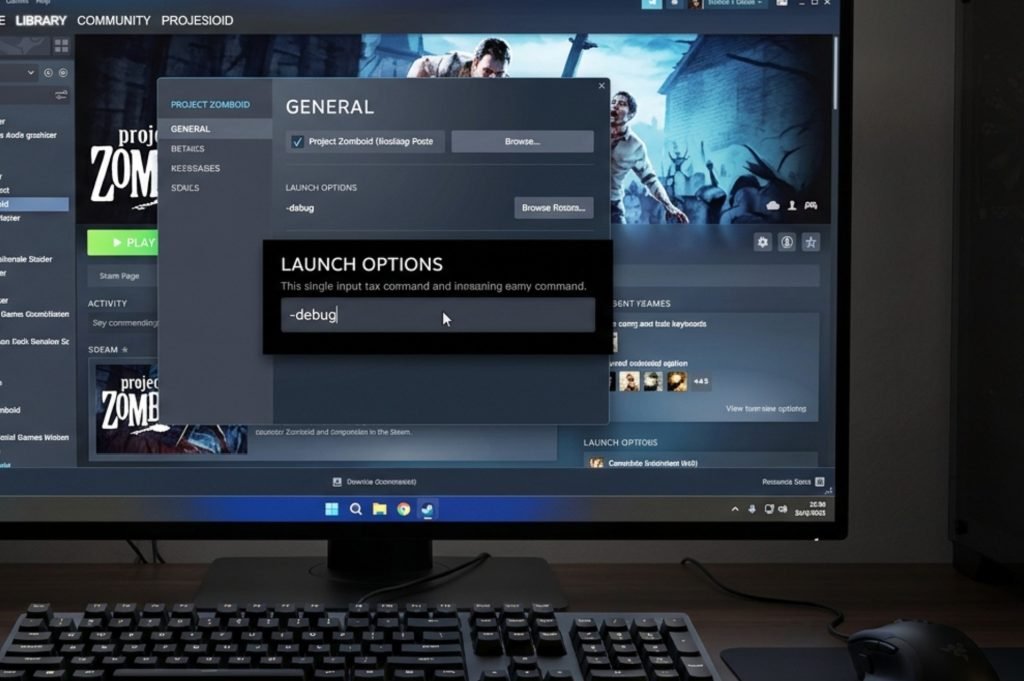
Debug mode is enabled with a Steam launch option, not from inside the game. It takes about thirty seconds:
Open your Steam library and find Project Zomboid.
Right click it and choose Properties.
On the General tab, find the Launch Options box.
Type the launch option exactly, with the hyphen and no quotation marks:
-debug
Close the Properties window and launch Project Zomboid.
That is the whole setup. The launch option tells the game to boot into debug mode every time you start it, so it stays on until you remove it.
How to Know It Worked
Once you are in a game with debug mode active, a small ladybug icon appears on your screen, usually in the top left. That ladybug is your gateway, click it to open the debug menu. If you do not see the ladybug, debug mode did not apply.
Nine times out of ten the fix is simple: go back into Launch Options and check that you typed -debug exactly, with the hyphen and no quotes, and that you set it on the right game. Then fully restart Project Zomboid, not just reload the save.
What Debug Mode Lets You Do
Click the ladybug and you get the debug menu, which is organized into groups. In the current Build 42 version these include General debuggers, Cheats, Climate debuggers, Craft Recipes, Player's Stats, an Items List, and more.
The highlights are the ones most people turn debug mode on for:
Spawn any item. The Items List lets you search the entire game and add anything straight to your inventory, from food and tools to weapons and car parts.
Edit your stats. Player's Stats lets you adjust health, hunger, mood, skills, and more, so you can heal up, wipe a bad moodle, or hand yourself skill levels.
God mode and cheats. The Cheats group includes toggles like invincibility and unlimited carry, handy when you want to build or explore without dying.
Teleport and manipulate the world. Right click almost anywhere in the world with debug on and you get a context menu full of extra options, including teleporting your character, spawning zombies or vehicles, and more.
Control time and weather. The climate tools let you change the time of day and the weather on demand.
How to Spawn Items (the Most Common Use)
Since item spawning is what most players want, here is the quick version. With debug mode on, open the ladybug menu and go to the Items List. Search for what you want, and click it to add it to your character.
You can also right click in the world and use the spawn options in the context menu. It is the fastest way to kit yourself out or test a build without scavenging for hours.
How to Turn Debug Mode Off
Turning it back off is just the setup in reverse. Go back to Properties, open Launch Options, delete -debug, and close the window. Then fully restart the game.
The ladybug will be gone and you are back to a normal survival run.
Two Honest Warnings
Debug mode is powerful, so two things are worth knowing before you flip it on.
It disables achievements for that save. Using debug mode switches off Steam achievements for the save you use it on, so keep a separate save if you are chasing them.
Build 42 is still an unstable beta. The current build changes often and can be buggy, and debug tools can crash the game or scramble a save in rare cases. Make a backup save before you go wild, especially before spawning a pile of things or editing the world.
The Bottom Line
Enabling debug mode in Project Zomboid is a one step job: add -debug to your Steam launch options, start the game, and click the ladybug.
From there you can spawn items, teleport, edit stats, and cheat to your heart's content, just keep a backup save and expect the odd rough edge in Build 42. Once you are in, our full cheats and debug commands guide walks through every option worth knowing.
FAQ
How do you enable debug mode in Project Zomboid?
Right click Project Zomboid in Steam, open Properties, and in the Launch Options box on the General tab type -debug with the hyphen and no quotes. Close it and launch the game. A ladybug icon appears when debug mode is active.
What is the Project Zomboid debug launch option?
It is -debug, typed exactly with the hyphen and no quotation marks, in the Steam Launch Options for Project Zomboid. It boots the game into debug mode every time until you remove it.
Why is the debug ladybug or menu not showing?
Debug mode did not apply. Check that you typed -debug exactly in Launch Options, with the hyphen and no quotes, that it is set on the right game, and then fully restart Project Zomboid rather than just reloading your save.
Does debug mode disable achievements in Project Zomboid?
Yes. Using debug mode turns off Steam achievements for that save, so use a separate save if you still want to earn them.
How do I spawn items in debug mode?
Open the ladybug menu, go to the Items List, search for the item, and click it to add it to your inventory. You can also right click in the world and use the spawn options in the context menu.
How do I turn debug mode off?
Remove -debug from the Steam Launch Options and fully restart the game. The ladybug disappears and you are back to a normal playthrough.
Which infantry should you field in Bannerlord? We rank the best foot troops for 2026, led by the Imperial Legionary and the Sturgian Heroic Line Breaker, with each faction's best, the shield wall versus two handed question, and how to use infantry to anchor your army.
Which archers should you field in Bannerlord? We rank the best ranged units for 2026, led by the Battanian Fian Champion, plus Palatine Guards, Sharpshooters and the top horse archers, with how to position archers and what hard counters them.
Our second indie spotlight. Five more games on our radar: a cyberpunk point & click, an emotional stray cat, a brutal precision platformer, a darkly comic zombie auto battler, and an arcade era score chaser. We have not gone hands on yet, but here is why each one caught our eye.
Interested in the Atari 50: Anniversary Collection? We'll weigh up the collection's content and extras to help you decide if it's worth investing in or not
Your Star Player career is only as good as the player you build. Here is how special abilities work in eBaseball Pro Spirit 2026, which ones actually move the needle for batters and pitchers, the Carry Over shortcut, and why raising the right stats comes first.
Skills in Project Zomboid are a slow grind unless you know the tricks. Here is how to level fast in Build 42: the skill book XP multiplier that changes everything, the early TV shows you cannot miss, and the fastest honest grind for Carpentry, Cooking, Fitness, and combat.
Got questions? Have an article idea you want to pitch? Or do you just want to talk about why City of Heroes is one of the greatest MMOs of all time? Then send us an email! :)